Full Stack Web Developer course
-
Byadmin
Get unlimited access to all learning content and premium assets Membership Pro
Full Stack Web Developer Course: Johannesburg Guide
The demand for skilled Full Stack web developers is always on the rise. Whether you are starting from scratch or a tech enthusiast wanting to improve your skills, you must understand the available options. I will guide you through the different web development courses out there, helping you decide what is best for your future.
Why Study Full Stack Web Development course in Johannesburg?
Johannesburg is a vibrant center for both new ideas and established businesses. This creates real opportunities for people who have the right tech skills. A Full Stack Web Developer course is not just about learning how to write code. It is about opening doors to a future packed with possibilities. It is about developing into a problem solver, an innovator and a person who brings significant value to any team.
We started Code Street Academy because we identified a hole in the educational options. We recognized that many up and coming developers struggled to find training that was complete, hands on and relevant to the local market. Because of this, we made the decision to create a learning environment that truly gets people ready for both the challenges and the possibilities within the South African tech sector.
Our Full Stack Web Developer course goes far beyond typical classroom lectures and homework assignments. It is a thoughtfully designed program intended to pull you into the world of web development. We strongly advocate for hands on learning. Therefore, the course work is heavily based on projects. You will not only study the concepts. You will develop functioning applications from beginning to end.
A Coursework Intended for Achievement
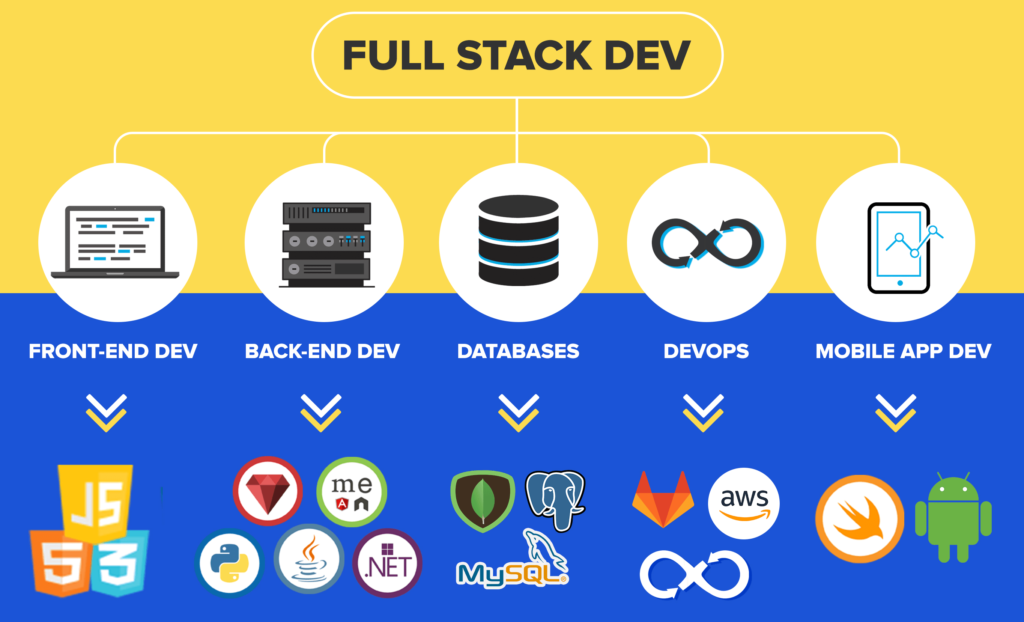
We have carefully planned the coursework to ensure a firm base of knowledge in both front end and back end technologies. Here is a quick look at the things you will learn:
- HTML, CSS and JavaScript: The fundamental components of the web. You will master these languages to design engaging user interfaces that respond well.
- Front End Frameworks: Explore well known frameworks such as React, Angular or Vue.js to develop complex web applications that can grow.
- Back End Development: Study server side programming using Node.js, Python or Java. Design stable APIs.
- Databases: Use databases like MySQL, PostgreSQL or MongoDB to hold and handle data effectively.
- Version Control: Become skilled in Git and GitHub for effective teamwork with other developers.
- Deployment: Find out how to put your web applications on platforms such as AWS, Azure or Google Cloud.
Experienced Teachers and Guides
Our teachers are not only educators. They are seasoned experts who have worked in the field for years. They are excited to share what they know and guide you as you learn. We have mentorship programs too. These programs connect you with experienced developers who can give insight, support and advice about your career.
A Helpful Learning Group
Learning to write code can be hard. It does not have to feel isolating. At Code Street Academy, you will join a lively group of other students. You can work together on projects, share your insights and help each other as you go. We encourage a culture of teamwork and shared growth. This produces a reliable space where everyone can succeed.
What really makes us stand out from other schools is how much we care about your progress. We want to teach you how to write code, and we want to help you begin a great career as a Full Stack Web Developer. We offer career advising, resume help and practice interviews to help you get the job you want.
A Full Stack Web Developer course at Code Street Academy is an investment in your long term success. It is a chance to gain sought after abilities, begin a satisfying career and truly improve the world. Join us and become one of the many talented web developers who are shaping the direction of technology in Johannesburg and elsewhere. We are confident that with commitment and the correct training, anyone can become a successful web developer. Take the next step toward the career you want and sign up for our Full Stack Web Developer course today!
- 21 Sections
- 347 Lessons
- 16 Weeks
- Introduction to Web Development1
- How the Internet Works7
- The Web Development Process1
- Planning a Website1
- Web Hosting and System Requirements5
- Domain Names9
- Testing Environment5
- Production Environment30
- 8.1Overview of production Environment
- 8.2Cloud Hosting Registration
- 8.3Creating a Virtual Server
- 8.4Linode Settings and Configuration
- 8.5Deploying an Image – Ubuntu 14.04 LTS
- 8.6Linode Dashboard
- 8.7Remote Access
- 8.8Download PuTTY and PuTTYgen – Windows
- 8.9Launch Terminal MAC
- 8.10Intro to Command Console
- 8.11Connecting with PuTTY – Windows
- 8.12Connecting with Terminal – MAC
- 8.13Maintenance Commands
- 8.14File and Directory Commands
- 8.15Installing LAMP Stack
- 8.16Server Host Name and Date
- 8.17Creating a User – Ubuntu
- 8.18Ubuntu SSH Authentication – Windows
- 8.19Ubuntu SSH Authentication – MAC
- 8.20Web Root Permissions
- 8.21Remote Dekstop Connection
- 8.22Installing Tight VNC Viewer – Windows
- 8.23Installing RealVNC Viewer – MAC
- 8.24Ubuntu Desktop Basics
- 8.25Disable Root and Password Access
- 8.26Re-sizing a Linode Server
- 8.27Creating Backups on Linode
- 8.28Changing Root Password through Linode
- 8.29Linode DNS Manager
- 8.30Amending GoDaddy Name Servers
- FTP Setup4
- HTML Development39
- 10.1Introduction to HTML
- 10.2Basic Structure of a Web Page
- 10.3HTML Head Tags
- 10.4HTML Body Tag
- 10.5HTML Paragraph Spacing
- 10.6HTML Line Breaks
- 10.7HTML Non-Breaking Space
- 10.8HTML Header Tags
- 10.9HTML Text Formatting and Decoration
- 10.10HTML Inline Text Formatting
- 10.11HTML Unordered Lists
- 10.12HTML Ordered Lists
- 10.13HTML Image Insertion
- 10.14HTML Embedding Video
- 10.15HTML Absolute vs. Relative File Referencing
- 10.16HTML Link Creation
- 10.17HTML Anchor Tags
- 10.18HTML Tables
- 10.19HTML Nested Tables
- 10.20HTML Merging Cells
- 10.21HTML Text Wrapping
- 10.22HTML Table Background Image
- 10.23HTML Table Cell Alignment
- 10.24HTML – Introduction to Forms
- 10.25HTML Form Tags and Attributes
- 10.26HTML Forms – Post vs. Get
- 10.27HTML Forms – Input Text Fields
- 10.28HTML Forms – Select Menus
- 10.29HTML Forms – Check Boxes and Radio Buttons
- 10.30HTML Forms – Text Areas and Buttons
- 10.31HTML Iframes
- 10.32HTML Project – Introduction
- 10.33HTML Project – Header
- 10.34HTML Project – Callout
- 10.35HTML Project – Image Insertion
- 10.36HTML Project – Text Insertion
- 10.37HTML Project – Links and Form
- 10.38HTML Project – Tabular Data
- 10.39HTML Project – Footer
- CSS Development31
- 11.1Introduction to CSS
- 11.2Parts of a CSS Rule
- 11.3Types of CSS Rules
- 11.4CSS – Color Names and Codes
- 11.5CSS Classes and Spans
- 11.6CSS Divisions – DIVs
- 11.7CSS IDs
- 11.8CSS Margins
- 11.9CSS Padding
- 11.10CSS Text Properties
- 11.11CSS Font Properties
- 11.12CSS Borders
- 11.13CSS Backgrounds
- 11.14CSS Transparency
- 11.15CSS Width and Height Properties
- 11.16CSS Text on Top of Images
- 11.17CSS Display Properties
- 11.18CSS Static Positioning
- 11.19CSS Relative Positioning
- 11.20CSS Absolute Positioning
- 11.21CSS Fixed Positioning
- 11.22CSS Float Property
- 11.23CSS Clear Property
- 11.24CSS Z-Index
- 11.25CSS Styling Links
- 11.26CSS Tables
- 11.27CSS Project – Introduction
- 11.28CSS Project – CSS Rules
- 11.29CSS Project – Navigation Rules
- 11.30CSS Project – Responsive CSS
- 11.31CSS Project – Page Elements
- Document Object Model (DOM)2
- JavaScript Development41
- 13.1JavaScript – Introduction
- 13.2JavaScript Placement
- 13.3External JavaScript
- 13.4JavaScript Output
- 13.5JavaScript InnerHTML
- 13.6JavaScript Commenting
- 13.7JavaScript Constants
- 13.8JavaScript Variables Introduction
- 13.9JavaScript Assignment Operator
- 13.10JavaScript Arithmetic Operations
- 13.11JavaScript Arithmetic Operations Continued
- 13.12JavaScript Operator Precedence
- 13.13JavaScript Data Types
- 13.14JavaScript Objects
- 13.15JavaScript Object Output
- 13.16JavaScript Strings
- 13.17JavaScript String Length
- 13.18JavaScript Special Characters
- 13.19JavaScript Random Numbers
- 13.20JavaScript Min and Max Function
- 13.21JavaScript Math Round Function
- 13.22JavaScript Arrays
- 13.23JavaScript Array Attributes
- 13.24JavaScript Arrays – Pop – Push – Shift – Unshift
- 13.25JavaScript Changing and Deleting Elements
- 13.26JavaScript Splicing an Array
- 13.27JavaScript Sorting an Array
- 13.28JavaScript Joining Arrays
- 13.29JavaScript Conditional Statements
- 13.30JavaScript Comparisons
- 13.31JavaScript Booleans
- 13.32JavaScript For Loops
- 13.33JavaScript For-In Loop
- 13.34JavaScript While Loops
- 13.35JavaScript Do-While Loop
- 13.36JavaScript Break and Continue
- 13.37JavaScript Functions
- 13.38JavaScript Events
- 13.39JavaScript Project 1 – BG Color Changer
- 13.40JavaScript Project 2 – Photo Gallery
- 13.41JavaScript Project 2 – Completion
- jQuery Library21
- 14.1Introduction to jQuery
- 14.2Embedding jQuery
- 14.3jQuery Events – mousedown and mouseup
- 14.4jQuery Multiple Event Handlers
- 14.5jQuery Hiding-Showing
- 14.6jQuery Toggle
- 14.7jQuery Fade In-Out
- 14.8jQuery Fade Toggle
- 14.9jQuery Fade To
- 14.10jQuery Slide Down
- 14.11jQuery Slide Up
- 14.12jQuery Slide Toggle
- 14.13jQuery Animate
- 14.14jQuery Animate – Multiple Params
- 14.15jQuery Animate – Relative Values
- 14.16jQuery Animate – Queue Functionality
- 14.17jQuery Stop Method
- 14.18jQuery Callback Functions
- 14.19jQuery Chaining
- 14.20jQuery Draggables
- 14.21jQuery Accordian Menu
- Bootstrap Framework43
- 15.1Introduction to Bootstrap
- 15.2Embedding Bootstrap
- 15.3Bootstrap – Basic Page Structure
- 15.4Bootstrap Grid System
- 15.5Bootstrap Three Column Layouts
- 15.6Bootstrap Typography
- 15.7Bootstrap Styling Images
- 15.8Bootstrap Jumbotron
- 15.9Bootstrap Wells
- 15.10Bootstrap Alerts
- 15.11Bootstrap Buttons
- 15.12Bootstrap Button Groups
- 15.13Bootstrap Justified Button Groups
- 15.14Bootstrap Glyphicons
- 15.15Bootstrap Badges and Labels
- 15.16Bootstrap Progress Bars
- 15.17Bootstrap Pagination
- 15.18Bootstrap Pager Pagination
- 15.19Bootstrap List Groups
- 15.20Bootstrap Panels
- 15.21Bootstrap Dropdown Menus
- 15.22Bootstrap Collapsibles
- 15.23Bootstrap Collapse Panel
- 15.24Bootstrap Collapse List Group
- 15.25Bootstrap Accordian
- 15.26Bootstrap Tab Menus
- 15.27Bootstrap Pill Menus
- 15.28Bootstrap Dynamic Tabs and Pills
- 15.29Bootstrap Navigation Bar
- 15.30Bootstrap Collapsible Navigation Bar
- 15.31Bootstrap Forms – Vertical and Inline
- 15.32Bootstrap Inputs
- 15.33Bootstrap Form Control States
- 15.34Bootstrap Input Sizing
- 15.35Bootstrap Carousel
- 15.36Bootstrap Modal
- 15.37Bootstrap Tooltip
- 15.38Bootstrap Popover
- 15.39Bootstrap Scrollspy
- 15.40Bootstrap Project – Themes Intro
- 15.41Bootstrap Project – File Overview
- 15.42Bootstrap Project – Script Overview
- 15.43Bootstrap Project – Script Overview Continued
- PHP Development30
- 16.1PHP Introduction
- 16.2PHP Preparation
- 16.3PHP File Test
- 16.4PHP Syntax
- 16.5PHP Variables
- 16.6PHP Variable Scope
- 16.7PHP Global Keyword
- 16.8PHP Static Keyword
- 16.9PHP Echo vs Print
- 16.10PHP Data Types
- 16.11PHP Objects
- 16.12PHP Strings
- 16.13PHP Constants
- 16.14PHP Operators
- 16.15PHP Conditional Statements
- 16.16PHP ElseIf Statement
- 16.17PHP Switch Statement
- 16.18PHP While Loops
- 16.19PHP For Loops
- 16.20PHP Functions
- 16.21PHP Functions Continued
- 16.22PHP Arrays
- 16.23PHP Multidimensional Arrays
- 16.24PHP Sorting Arrays
- 16.25PHP Superglobal Variables
- 16.26PHP Forms Introduction
- 16.27PHP POST vs GET Basics
- 16.28PHP Form Output and Validation
- 16.29PHP Form Required Fields
- 16.30PHP Validation Continued
- MySQL Database Integration27
- 17.1Introduction to MySQL Databases
- 17.2Introduction PhpMyAdmin
- 17.3PhpMyAdmin Interface Overview
- 17.4MySQL Security and Root Superuser
- 17.5MySQL Creating a Database and Table
- 17.6MySQL Creating a New User
- 17.7MySQL Database and Table Specific Privileges
- 17.8MySQL Modifying and Deleting a Table
- 17.9MySQL Modifying and Deleting a Database
- 17.10Introduction to SQL
- 17.11SQL Statements in PhpMyAdmin
- 17.12Connect to MySQL Database using PHP
- 17.13MySQL Database – Import Data
- 17.14SQL Select
- 17.15SQL Distinct Keyword
- 17.16SQL Where Clause
- 17.17SQL And Operator
- 17.18SQL Or Operator
- 17.19SQL Order By
- 17.20MySQL Insert Into
- 17.21MySQL Get Last ID
- 17.22MySQL Insert Multiple Records
- 17.23MySQL Prepared Statements
- 17.24MySQL Delete Records
- 17.25PHP Header Function
- 17.26PHP Isset
- 17.27MySQL Update Records
- XML l AJAX8
- Development Project20
- 19.1Development Overview
- 19.2Project Setup
- 19.3Index Page Overview
- 19.4Home Page Mods
- 19.5About Page Mods
- 19.6Blog Page Mods
- 19.7MySQL Database Creation
- 19.8Creating a Registration Form
- 19.9Registration Status using JavaScript and AJAX
- 19.10PHP Validation – Encryption – Session
- 19.11Login Authentication – Part 1
- 19.12Login Authentication – Part 2
- 19.13Login Authentication – Part 3
- 19.14Login Authentication – Part 4
- 19.15Logout – Terminate Session
- 19.16Contact Page – Google Maps API
- 19.17Contact Form – AJAX Integration
- 19.18PHPMailer Installation
- 19.19PHP Form Validation and Email Transmission
- 19.20Production Server Migration
- Google Apps for Work3
- Bonus SSL Certificates - How to Secure your Server19
- 21.1Introduction to SSL Certificates
- 21.2Traditional vs. Digital Certificate
- 21.3Types of SSL Certificates
- 21.4How SSL Certificates Work
- 21.5Obtaining a SSL Certificate
- 21.6Introduction to Lets Encrypt
- 21.7Preparation
- 21.8Domain Name Server Administration
- 21.9Introduction to Digital Ocean
- 21.10Droplet Configurations
- 21.11Creating a Droplet
- 21.12Install PuTTY-Terminal and Connect
- 21.13Install LAMP Stack – Apache, MySQL, PHP
- 21.14Configure DNS on Digital Ocean
- 21.15Droplet Basic Configurations
- 21.16Installing Lets Encrypt
- 21.17SSL Certificate Status Reports
- 21.18Redirect all Domain Variations to HTTPS
- 21.19Auto Renewal with cron jobs
Get unlimited access to all learning content and premium assets Membership Pro
You might be interested in
-
All levels
-
0 Students
-
189 Lessons
-
All levels
-
0 Students
-
267 Lessons
-
All levels
-
26 Students
-
0 Lessons
-
All levels
-
50 Students
-
0 Lessons
Sign up to receive our latest updates
Get in touch
Call us directly?
Address
- © 2025 Code Street Academy .All rights reserved.